Ninja Transfers
Ninja TransfersShopping
4.648.00 Reviews
- Version
- 1.15.0
- Installs
- 10.00K
- Age Rating
- Everyone
Screenshots
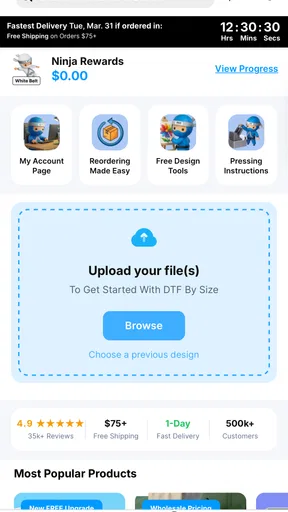
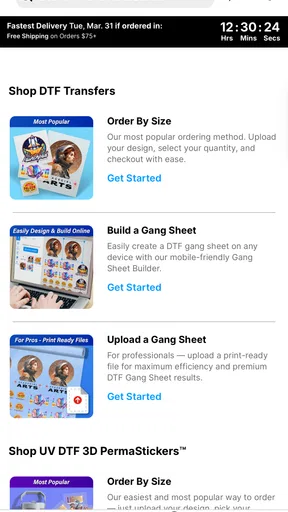
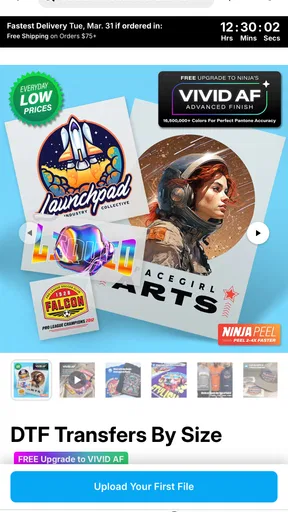
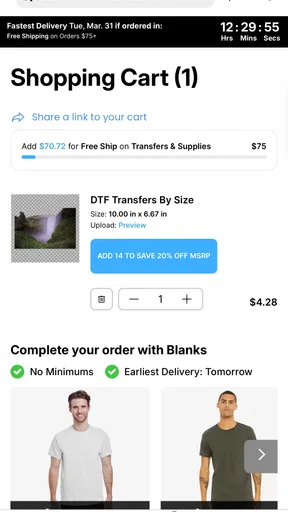
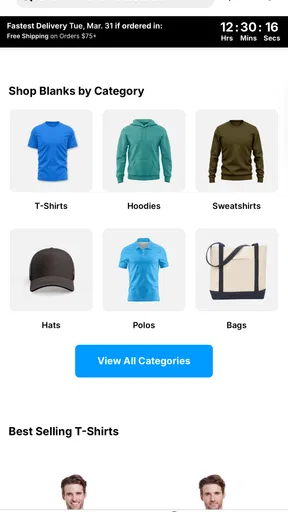
Our Review of Ninja Transfers
 Analysis by Appyee
I came to Ninja Transfers with a practical question: can a shopping app make the process of ordering DTF prints and blanks feel manageable when I am starting with an artwork file, a garment idea, or a small custom project? My impression is that it is aimed less at casual browsing and more at people who already know they need transfer materials, whether that means a small clothing business, a creator preparing merchandise, or someone testing a design before committing to a larger production run.
The app is free to download, is listed for Everyone, and comes from Ninja Transfers. Its focus is narrow in a useful way: full-color DTF prints and blanks, with an emphasis on ordering without a minimum quantity. That makes the starting condition different from a general shopping app. I am not opening it to compare unrelated products; I am opening it because I have a design problem to solve and need a path from idea to printable item.
That focused purpose is also why I would not recommend it automatically to every shopper. If you only want finished clothing, a broad fashion marketplace may be quicker. If you need a wide range of craft supplies, a general marketplace will probably offer more categories. But when the job is to source DTF-related products and keep a small order practical, this app has a more relevant starting point.
From artwork or garment idea to an order
I use this section to connect a design or garment idea to the practical choices involved in ordering, rather than treating browsing as the whole job. A helpful habit is to decide in advance what I want to learn from the first order—such as whether a design works on a particular blank—so a small test gives me a clear answer before I commit to more.
Beginning with the right project
The first useful decision is not inside the app at all: I need to know what I am trying to produce. A single shirt for an event, a handful of sample garments, and a repeatable design for a small shop are three different buying situations. The no-minimum approach is particularly helpful for the first two because I can think in terms of testing rather than immediately buying a large batch.
For a small clothing project, I would prepare the artwork before browsing. That means checking the design at the intended size, looking closely at fine text, and making sure transparent areas are intentional. A shopping app can help me choose a transfer or blank, but it cannot rescue artwork that was prepared carelessly. This is one of the less obvious parts of the workflow: the quality of the final shirt depends on decisions made before the product page is even opened.
I would also decide whether I am buying a transfer to apply to a garment I already own or a blank garment to decorate later. Those are separate workflows. A transfer order needs attention to the design and its intended application. A blank order needs attention to garment choice, sizing, color, and the eventual pairing between fabric and artwork. Keeping those decisions separate prevents a common mistake: choosing a blank because it looks attractive on screen and only later discovering that it does not suit the design.
Browsing with a production goal
Once I enter the catalog, I find the app more useful when I browse with a short checklist instead of scrolling aimlessly. I would first identify the type of item, then compare the available options against the project, and only after that think about quantity. The app’s shopping focus makes this sequence feel more natural than searching through a general marketplace where DTF products may be mixed with unrelated printing supplies.
The store summary highlights fast, durable, full-color DTF prints and blanks, but I would treat those words as a starting point rather than a substitute for inspecting the actual product information. For my own order, I would pay attention to the design dimensions, the garment details, the selected color, and any preparation requirements shown during the purchase flow. A vivid preview is not enough; the physical result depends on the relationship between the transfer, the fabric, and the application process.
One practical tip is to keep the final design name and garment choice written down before adding items to the cart. This sounds simple, but it helps when I am comparing several versions of the same concept. A small project can become confusing if I have multiple colors or sizes open and rely only on memory. The app is a tool for completing the order, not a replacement for a basic production note.
Checking the cart before the handoff
The cart is the point where an idea becomes a purchase, so I would slow down here. I would verify that the transfer or blank matches the project, check the selected quantity, and review every variation that matters. For a business, this is also where I would separate a test order from inventory. Mixing the two can make it difficult to understand whether a later problem came from the artwork, the garment, or the ordering decision.
Because the app is free, the main commitment is not an upfront app cost but the product order itself. That distinction matters. I can install it and explore the catalog without paying for access, yet I still need to evaluate each purchase carefully. A free shopping app is not automatically a low-cost production solution; the value comes from whether the selected items fit the project and avoid unnecessary waste.
I would also take a screenshot or keep a written record of the chosen design and options before submitting the order. This is not a special feature I am attributing to the app; it is a sensible handoff habit. When a project moves from my screen to a production or fulfillment process, a clear reference reduces uncertainty. It is especially useful if I am ordering on behalf of someone else or passing the finished item to a customer.
The handoff from shopper to maker
The most important handoff is the moment when I stop making design decisions and start waiting for the ordered materials. Before that point, I control the artwork, the item selection, and the quantity. After it, the quality of the outcome depends on the supplied transfer or blank and on how carefully I apply the design. Thinking about the order this way helps me avoid blaming the app for a problem caused later by pressing technique, fabric choice, or an unsuitable design.
For a small business, there may be another handoff: I might order a transfer through the app, then give it to a team member who handles pressing and packing. In that situation, the order information should travel with the item. I would record which garment the transfer is intended for, where it should be placed, and whether it is a sample or a sellable piece. A narrow shopping app cannot manage that whole internal process for me, but it can be part of a clean chain if I keep the surrounding notes organized.
This is where Ninja Transfers feels different from buying a finished shirt from a marketplace. A finished-goods marketplace handles more of the production for me, but gives me less control over the blank and application stage. Here, I am closer to the making process. That is valuable when I want to experiment or control the result, but it also means I carry more responsibility after checkout.
What the result means in practice
For me, the best outcome is not simply receiving a package. It is receiving the right transfer or blank for the planned job and being able to move to application without rethinking the whole project. The app’s appeal is strongest when I have a defined design and want a focused route to DTF materials rather than a long search across unrelated listings.
Imagine a realistic everyday scenario: I am preparing a small run of shirts for a local event and do not yet know whether people will prefer a dark or light garment. I can use the app to treat the first order as a controlled test, choosing a limited quantity rather than filling a shelf with untested stock. I can compare the design on the intended blank, check the finished appearance, and then make a better-informed decision about a later order. That workflow is more sensible than guessing at scale.
Another useful scenario is a creator who wants to validate merchandise before announcing it. Ordering a small set of materials allows the creator to inspect the physical result, photograph it, and decide whether the artwork needs adjustment. The important insight is that the app can support an iteration loop: design, order, apply, inspect, revise. It is not only a place to buy supplies; it can sit inside a testing process.
For someone already experienced with DTF work, the focused catalog may save time. For a beginner, it can reduce the distraction of a general marketplace, but it does not remove the need to learn the application process. I would still read the product instructions carefully, prepare the garment properly, and test an unfamiliar combination before promising a finished item to another person.
Where the workflow becomes less comfortable
The flow breaks when I expect the app to answer questions that belong to the physical production stage. Browsing can show me what I might order, but it cannot replace a test press when I am using an unfamiliar fabric or a detailed design. A transfer that looks perfect in a preview still needs to be handled correctly. This is a real limitation for first-time users who want a completely guided, end-to-end service.
The workflow can also become slower when I am comparing many variations. DTF projects often involve combinations of artwork, garment color, size, and quantity. The more combinations I consider, the more important it becomes to track them outside the app. I would not rely on a quick cart review alone for a complex business order. A simple spreadsheet or project note is better for preventing mismatched selections.
Another trade-off is control versus convenience. Ordering materials gives me more control than purchasing a finished product, but it creates extra work. I need to apply the transfer, inspect the result, and handle any presentation or packing myself. If my priority is speed from purchase to wearing the item, a finished-garment service may be a better fit. If my priority is experimenting with blanks and designs, the additional work is part of the benefit.
I would also be cautious about treating the phrase “no minimums” as a promise that every project is economical. Small orders are convenient for testing, but shipping and preparation effort can still matter to the overall value. For a one-off project, I would compare the complete cost and time against buying a finished shirt. For repeat work, I would evaluate whether the ability to order only what I need reduces unused inventory enough to justify the process.
Who will get the most from it
I see the app as a strong match for independent creators, small apparel sellers, event organizers, and hobbyists who want to work with DTF prints or blanks without beginning with a large commitment. It is also useful for someone who already has a press workflow and needs a focused shopping destination rather than a broad craft store.
It is less suitable for a person who wants the app to design the artwork, choose the complete outfit, apply the transfer, and deliver a ready-to-wear product with no manual steps. It is also not my first choice for someone looking for a broad shopping experience across many unrelated categories. The narrower focus is an advantage only when it matches the job.
The app has built a respectable audience for a specialized shopping tool, with an average rating of 4.6 from around 204 ratings and more than 10 thousand installs. I read those figures as a sign that the concept is resonating, not as a guarantee that every order will suit every project. Individual results still depend on the design, the selected blank, and what happens after the package arrives.
Day-to-day usability and version context
The current version is 1.15.0, and the app supports devices running Android 7.0 or later. That broad compatibility is helpful if I am using an older phone dedicated to business tasks or inventory work. I would still keep the app updated when possible, especially for a shopping workflow where catalog presentation and checkout reliability matter.
In daily use, I would treat the phone as the ordering station and keep the production details elsewhere. The phone is convenient for browsing during a break, checking a product while standing near my blank garments, or placing a small replenishment order. It is less convenient as the only place to manage a large design library or a complicated apparel plan. That division of labor makes the overall workflow calmer.
Since the app is rated for Everyone, it is approachable from an age-rating standpoint, but the actual usefulness is still tied to the user’s project knowledge. A younger or less experienced user may be able to browse it easily while needing adult guidance for equipment, heat, garment handling, or business purchasing decisions. The simple access level should not be confused with a completely hands-off crafting experience.
My recommendation after following the full workflow
I would recommend Ninja Transfers to a friend who already has a DTF project in mind and wants a focused way to source prints or blanks, especially when ordering a small test quantity makes more sense than buying inventory in bulk. The strongest part of the experience is the connection between a specific design goal and a specialized shopping path. That focus can save time and make experimentation less intimidating.
My advice would be to use it deliberately: prepare the artwork first, decide whether the project needs a transfer or a blank, record the selected options, and treat the first order as a test when the material combination is unfamiliar. Keep the app’s role clear. It helps me obtain the materials, while the quality of the finished item still depends on careful application and inspection.
For finished apparel, broad shopping, or a fully managed printing service, I would choose a different type of solution. For hands-on creators and small sellers who want control without being forced into a large initial order, this app makes more sense. Its free access, specialized purpose, and support for small-scale buying give it a practical place in a DTF workflow, as long as I accept the extra responsibility that comes with making the final product myself.
Overall, I see it as a useful working tool rather than a magic shortcut. The real advantage is the ability to move from a concrete design idea to a manageable material order, then learn from the physical result before scaling up. That makes it worth trying for the right shopper, while the limitations are clear enough that I would not use it as a replacement for production planning or hands-on testing.
Verdict
Strengths of Ninja Transfers
- Fast, intuitive file transfers with minimal setup.
- Supports multiple transfer methods for added flexibility.
- Clean interface makes navigation easy for new users.
- Useful for sharing files between different devices.
- Transfers can reduce reliance on cables and cloud storage.
Limitations of Ninja Transfers
- Transfer speed depends heavily on Wi-Fi quality and device distance.
- Some features may require permissions that concern privacy-conscious users.
- Large files can take considerable time to transfer.
- Compatibility may vary across older Android and iOS devices.
- The app may offer limited value if you rarely share files.
Similar Picks in This Category
View All
SHEIN-Shopping Online
Roadget Business PTE. LTD.4.8

Amazon Shopping
Amazon Mobile LLC4.4


Mercado Libre: Compras online
Mercado Libre4.8

Wish: Shop and Save
Wish US Holdings LLC4.7

Alibaba.com - B2B marketplace
Alibaba Mobile4.4
Frequently Asked Questions
What is Ninja Transfers and what can I use it for?
Ninja Transfers is a service-focused app designed to help users arrange and manage transportation transfers, such as airport pickups, hotel journeys, or private rides. Before downloading, check whether the service operates in your destination and supports your preferred vehicle type. Availability, pricing, pickup instructions, and booking options may vary depending on location and local partners.
How do I book a transfer with Ninja Transfers?
After opening Ninja Transfers, you generally need to enter your pickup location, destination, travel date, and passenger details before reviewing available options. Carefully confirm the flight number, arrival time, address, luggage requirements, and contact information. Once the reservation is submitted, look for a confirmation message or voucher and keep it accessible during your journey.
Is Ninja Transfers available in every country or city?
No transportation-transfer platform can be assumed to work everywhere, so users should verify coverage before relying on it for an important trip. Ninja Transfers availability may depend on the destination, airport, transfer route, and local operator. Search for your exact pickup and drop-off locations in the app or website, and confirm that the service is available before making travel arrangements.
Can I cancel or change a Ninja Transfers reservation?
Cancellation and modification rules usually depend on the booking type, destination, supplier, and how close the request is to the scheduled pickup time. Review the terms shown before payment, particularly deadlines, refund conditions, and possible administrative fees. If your flight or plans change, contact support as soon as possible and provide your booking reference and updated travel details.
What should I do if I cannot find my driver or my transfer is delayed?
Keep your booking confirmation, driver instructions, meeting-point information, and support contact details available before leaving the airport. If the driver is not visible, check the designated pickup area and follow the instructions in the reservation rather than accepting an unsolicited ride. For delays, enter accurate flight information when booking and contact Ninja Transfers support promptly if the situation remains unresolved.
